Showing posts with label Anti Malware family. Show all posts

Saturday, June 12, 2010

Defense Center virus/malware

Defense Center is a new malicious program that classified as rogue antispyware application. It is from same family of rogues as Protection Center, Data Protection, Digital Protection, Your Protection, User Protection, Dr. Guard, Paladin Antivirus, Malware Defense and Anti Malware.

 Screen shoot of Defense Center

Like  other rogues, Defense Center installed through trojans. When the rogue is started, it will imitate a system scan and report various infections. All of these infections are a fake.

Defense Center is scam, which created with one purpose - to trick user into purchasing so-called "full" version of the program.

If your computer is infected with this malware then use the Defense Center removal instructions or the video guidelines.

Wednesday, June 2, 2010

Protection Center - rogue antispyware

Protection Center is a new rogue antispyware program from same family of rogues as Data Protection, Digital Protection, Your Protection, User Protection, Dr. Guard, Paladin Antivirus, Malware Defense and Anti Malware.


Screen shoot of Protection Center

Protection Center is installed onto a computer through trojans. Once started, it will simulate a scan and reports a lot of infections. All of these infections are fake.

Protection Center is scam, that created only for one - to trick user into purchasing so-called "full" version of the program.

If your computer is infected with this malware then use the Protection Center removal guidelines.

Saturday, May 8, 2010

How to remove Data Protection (Uninstall guidelines)

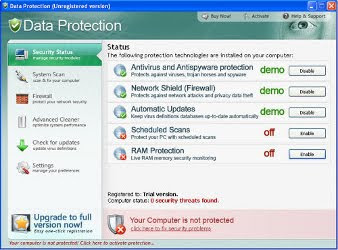
Data Protection is a new fake security program that looks like a real antispyware or antivirus application, but unlike it, can not remove viruses and trojans, as well as protect your computer from possible infections. This parasite is created with one purpose, to force you to buy its full version.


HijackThis shows Data Protection infection:

O4 – HKCU\..\Run: [Data Protection] “C:\Program Files\Data Protection\datprot.exe” -noscan

What Data Protection does


Data Protection infiltrate computers through the use of trojans. When the trojan is started, it adds itself to the list of startup programs to run every time when you start Windows, after that starts to show a lot of false alerts that you computer is infected. It will suggest to download and install an antivirus. This antivirus is a Data Protection.

When Data Protection is installed, it will register itself in the Windows registry to run automatically. Further, the program will begin a system scan and list a lot of trojans, viruses and other malicious programs. Of course, the scan and its results are a fake. The rogue uses the false scan results as method to trick you into purchase the full version of this program. So you can freely ignore all that Data Protection will show you.

Data Protection


While Data Protection is running, it will display various misleading notifications and fake security alerts from Windows taskbar. However, all of these alerts and notifications is a fake and like false scan result should be ignored.

The same trojan which installs Data Protection, will also download and install a TDSS trojan, which is very dangerous. It can block the work of antivirus software, redirect you to the malicious web sites, and much more.

As you can see, Data Protection is absolutely useless and what is more, even dangerous software. Most importantly, do not purchase it! Instead, please use the Data Protection removal guide or the instructions below to remove this malware from your computer for free.

How to remove Data Protection

1. Download TDSS trojan removal tool (TDSSKiller.zip) from here and save it to your desktop.
2. Unzip this file to your desktop. Open TDSSKiller folder and run TDSSKiller. If it won`t run, then rename tdsskiller to something like myapp (use any random name).
3. Run TDSSKiller and follow the prompts.
4. Download Malwarebytes Anti-malware.
5. Double click mbam-setup.exe to install the application.
6. When installation is complete, make sure a checkmark is placed next to Update Malwarebytes' Anti-Malware and Launch Malwarebytes' Anti-Malware, then click Finish.
7. If an update is found, it will download and install the latest version.
8. Once the program has loaded, select "Perform Quick Scan", then click Scan.
10. When the scan is done, click OK, then Show Results to view the results.
11. Make sure that everything is checked, and click Remove Selected.
12. Once disinfection is finished, a log will open in Notepad and you may be prompted to Restart.

If the instructions does not help you, then ask for help in the Spyware removal forum.

Sunday, April 11, 2010

How to remove Digital Protection ( Removal guide )

Digital Protection is a new rogue antispyware from the same family of rogues as Your Protection, User Protection, Dr. Guard, Paladin Antivirus, Malware Defender, Anti-malware.

HijackThis shows Digital Protection infection:
O4 – HKCU\..\Run: [davclnt.exe] C:\DOCUME~1\comp\LOCALS~1\Temp\davclnt.exe
O4 – HKCU\..\Run: [Digital Protection] “C:\Program Files\Digital Protection\digprot.exe” -noscan


Friday, April 2, 2010

Your Protection removal

Your Protection is a new rogue antispyware application from the same family rogues as User Protection, Dr. Guard, Paladin Antivirus, Malware Defender, Anti-malware.

HijackThis shows this infection:
O4 – HKCU\..\Run: [Your Protection] “C:\Program Files\Your Protection\urpprot.exe” -noscan

Your Protection is installed through the use of trojans.


Screen shoot of Your Protection from S!Ri.URZ blog

Once started, Your Protection will simulate a scan and reports a lot of infections to trick user into purchasing so-called "full" version of the program.

If your computer is infected with this malware then use the Your Protection removal guidelines.

Sunday, February 28, 2010

Dr. Guard

Dr. Guard is a new rogue antispyware program from same family of rogues as Paladin Antivirus, Malware Defense and Anti Malware.

 Screen shoot of Dr. Guard

Dr. Guard is installed onto a computer through trojans. Once started, it will simulate a scan and reports a lot of infections. All of these infections are fake. 

Dr. Guard is scam, that created only for one - to trick user into purchasing so-called "full" version of the program.

If your computer is infected with this malware then use the Dr. Guard removal guidelines.

Monday, February 8, 2010

Paladin Antivirus

Paladin Antivirus is a rogue antispyware program from the same family of malware as Malware Defense and Anti Malware.

Screen shoot of Paladin Antivirus

Paladin Antivirus is installed through the use of trojans. Once started, it will perform a scan and reports a lot of infections. All of these infections are fake. 

Paladin Antivirus is scam and designed to trick user into purchasing so-called "full" version of the program.

If your computer is infected with this malware then use the Paladin Antivirus removal instructions.